

In one of the latest projects we’re working on in Damavis, we began building an ETL process from scratch. On one hand, a team member was setting up the cloud architecture and all its components. Meanwhile, I was analszing the data and designing the pipeline for its transformation. We both knew that we would be performing the transformations in a relational database (SQL) in the cloud.
However, this system wasn’t set up yet, and the only data available were sample files. My goal was to design the pipeline in SQL, but in a Jupyter notebook because of its high level of interactivity and to analyse the data with Pandas. And that’s exactly where I came across DuckDB.
What is DuckDB?
DuckDB is a column-oriented SQL database designed for analytics. Among its most important features are its ease of installation and use, as well as its extensive SQL dialect. However, its greatest potential lies in its ability to read data from anywhere—whether from files (Parquet, CSV, etc.), other databases, cloud platforms, or directly from libraries such as Pandas.
Below, we’ll explore some features of the DuckDB Python client. However, the tool also has its own command-line interface (CLI) as well as clients in Java, R, and other languages.
Getting started with DuckDB
First, we’ll install the DuckDB Python client. To do this, we’ll use the pip command:
pip install duckdbOnce installed, you can execute an SQL statement using the .sql() function. The following example reads data from a CSV file:
import duckdb
duckdb_data = duckdb.sql("SELECT * FROM read_csv('my_data.csv')")
duckdb_data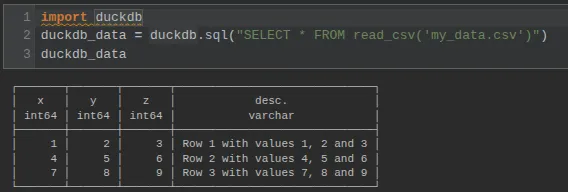
DuckDB can also read from Pandas, Polars, and Arrow dataframes. You simply use the variable name as if it were a table. In the following example, a Pandas dataframe is created and a query is run on it in DuckDB:
import pandas as pd
pandas_df = pd.DataFrame([['a', 'b'], ['c', 'd']],
                         columns=['col_1', 'col_2'])
duckdb.sql("SELECT * FROM pandas_df")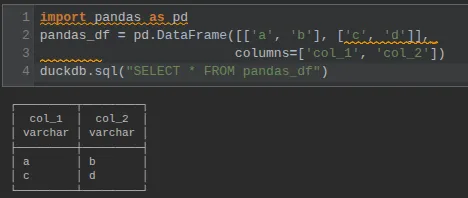
If we want the result to also be a Pandas DataFrame, we can use the .df() method on the query result.
How to create connections in DuckDB
By default, DuckDB connects directly to memory. This is where it can read dataframes, as shown in the previous example. However, it is possible to create a connection object directly using the .connect() function. To replicate the connection to memory, you can specify the string :memory:, as shown in this example:
con = duckdb.connect(':memory:')
con.sql("SELECT MAX(col_2) FROM pandas_df")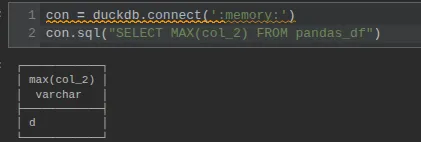
If you want to save the tables created in the database, you can specify a path where to save a DuckDB database file. In the following example, a connection is established with the db.duckdb file and the my_table table:
import os
duckdb_con = duckdb.connect("db.duckdb")
os.listdir()

#############################

duckdb_con.sql("DROP TABLE IF EXISTS my_table")
duckdb_con.sql("""
CREATE TABLE my_table AS (
    SELECT 1 x, 'example 1' y UNION ALL
    SELECT 2 x, 'example 2' y UNION ALL
    SELECT 3 x, 'example 3' y)
""")

duckdb_con.sql("SHOW TABLES")

#############################

duckdb_con.sql("SELECT * FROM my_table")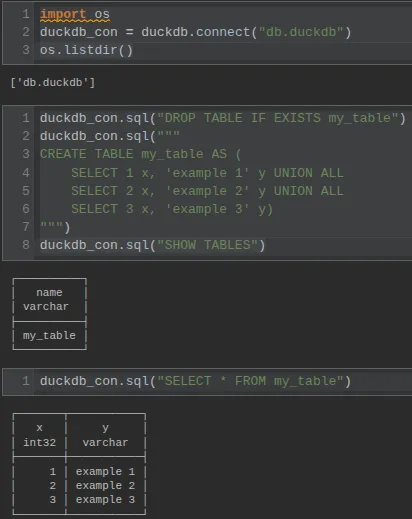
DuckDB connections to other databases
In addition, you can use extensions to connect to other databases. One such extension allows you to connect to Postgres. To do this, you must install the corresponding extension and then load it. You can then attach the Postgres database to DuckDB using the ATTACH statement.
duckdb.install_extension('postgres')
duckdb.load_extension('postgres')
pg_uri = 'postgresql://my_user:my_pass@localhost:5432/my_db'

pg_con = duckdb.connect()
pg_con.sql(f"ATTACH '{pg_uri}' AS pg_db (TYPE POSTGRES)")
pg_con.sql("USE pg_db")

pg_con.sql("DROP TABLE IF EXISTS my_table")
pg_con.sql("""
CREATE TABLE my_table AS (
    SELECT 4 x, 'example 4' y UNION ALL
    SELECT 5 x, 'example 5' y UNION ALL
    SELECT 6 x, 'example 6' y)
""")

pg_con.sql("SELECT * FROM my_table")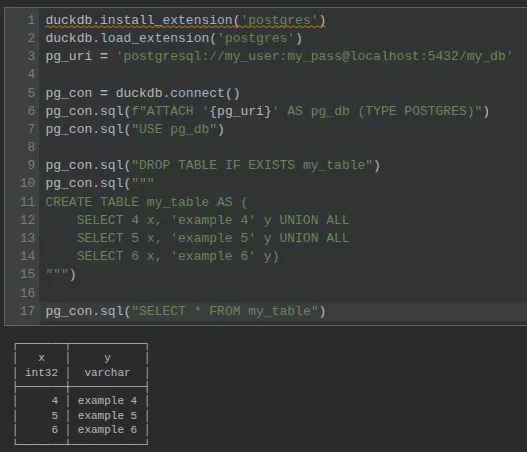
For this example, a docker compose container running Postgres with the following YAML configuration has been used:
name: my_postgres
services:
  db:
    image: postgres:latest
    environment:
      - POSTGRES_USER=my_user
      - POSTGRES_PASSWORD=my_pass
      - POSTGRES_DB=my_db
    ports:
      - "5432:5432"
SQL magic functions in DuckDB
If you’re working in a Jupyter notebook environment, you can enhance your “SQL experience” by using SQL magic functions in combination with DuckDB. To do this, you first need to install some additional dependencies:
pip install jupysql duckdb-engineOnce the dependencies are installed, the SQL magic function is loaded:
%load_ext sql
# Optional:
%config SqlMagic.autopandas = True
%config SqlMagic.feedback = False
%config SqlMagic.displaycon = False
Configuration statements are optional but highly recommended. In particular, the autopandas statement, which ensures that query results are Pandas dataframes and can be easily used with DuckDB.
The SQL magic function can be used in different ways. Either inline (%sql) mixed with Python code, or in a code block (%%sql), where you can take advantage of automatic SQL syntax highlighting. The following two examples illustrate both cases.
In the first example, a connection is made to the in-memory database, and an SQL statement is executed inline:
%sql duckdb:///:memory:/
%sql SET python_scan_all_frames=True
new_df = %sql SELECT *, col_1 || col_2 AS col_3 FROM pandas_df
new_df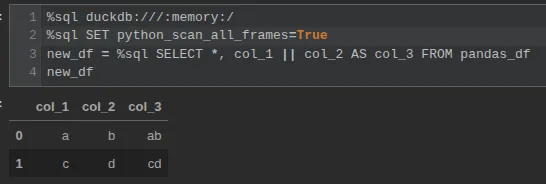
The second example shows how to use a previously defined connection (pg_con) to connect to Postgres (instead of repeating the ATTACH statement). In this case, a block of SQL code is used to execute the query. It also shows the (optional) syntax for storing the result in a dataframe (new_df << …).
%sql pg_con

#############################

%%sql new_df <<
    SELECT *, 'ABC' AS z
    FROM pg_db.my_table

#############################

new_df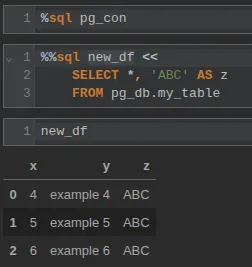
Conclusion
DuckDB is a tool that allows you to use a widely used language like SQL in a very flexible and straightforward way. It can be used as a database or to assist users with their data analysis. In our case, we were able to develop the ETL transformation pipeline in SQL while the entire architecture around it—including the database itself—was being set up.
If you found this article interesting, we encourage you to visit the Data Engineering category to see other posts like this one and to share it on social media. See you soon!
