

The task of selecting, training, and deploying a time-series prediction or anomaly detection model is complex, time-consuming, and uncertain. Given the difficulty of working with time series, having a fast model that serves as a baseline against which to test future models or developments is extremely useful.
BigQuery recently introduced TimesFM 3.0, the latest version of TimesFM, to its suite of ML models. With just a simple SQL call from BigQuery Studio, this model allows you to create a trained model.
Unlike other popular models such as ARIMA, it follows a Transformer architecture similar to that of the predecessors of large language models (LLMs). What’s interesting about this feature is that it limits the number of components you need to specify. Normally, before building a model, you need to know the seasonality, trend, and periodicity of the data. However, with TimesFM 3.0, these limitations do not exist.
In this article, we’ll explore what TimesFM 3.0 is and how it works to assess whether it’s worth using this model and how accurate it is.
BigQuery TimesFM 3.0 case study
Next, we’ll see how TimesFM 3.0 works in practice. To do this, we’ll use a sample dataset: NYC City Bike (which contains data from 2013 to 2016), a public dataset that also has some interesting properties.
First, we run a query to retrieve the data:
WITH trips AS (
SELECT DATE(starttime) AS trip_date, COUNT(*) AS num_trips
FROM `bigquery-public-data.new_york.citibike_trips`
WHERE starttime IS NOT NULL
GROUP BY 1
)
SELECT trip_date, COALESCE(num_trips, 0) AS num_trips
FROM UNNEST(GENERATE_DATE_ARRAY((SELECT MIN(trip_date) FROM trips),
(SELECT MAX(trip_date) FROM trips))) AS trip_date
LEFT JOIN trips USING (trip_date)
ORDER BY trip_date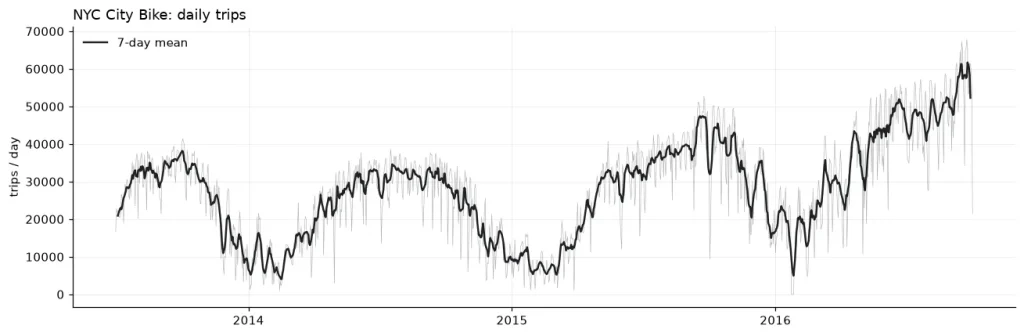
As you can see, the data exhibits interesting seasonality. When temperatures are higher, people use the service more. However, when the cold sets in, people tend to use it less. There is a weekly pattern, and we also see a gradual increase in usage year over year—a trend. We can even observe some anomalies, such as a steeper-than-usual drop in early 2016.
These characteristics make the data interesting enough to test some basic features of the model.
Forecasting with BigQuery TimesFM 3.0
To evaluate the model, we’ll start with a simple test. To do this, we’ll take the NYC City Bike data up to July 1, 2016, and ask the model to forecast the next 60 days (60-day horizon).
SELECT *
FROM AI.FORECAST(
(SELECT trip_date, num_trips
FROM `dataset.nyc_daily`
WHERE trip_date < DATE '2016-07-01'),
  data_col         => 'num_trips',
  timestamp_col    => 'trip_date',
  model            => 'TimesFM 3.0',
  horizon          => 60,
  confidence_level => 0.9
)
ORDER BY forecast_timestamp
Next, we generate a graph showing the model’s results and observe what happens over the time horizon beginning July 1, 2017:
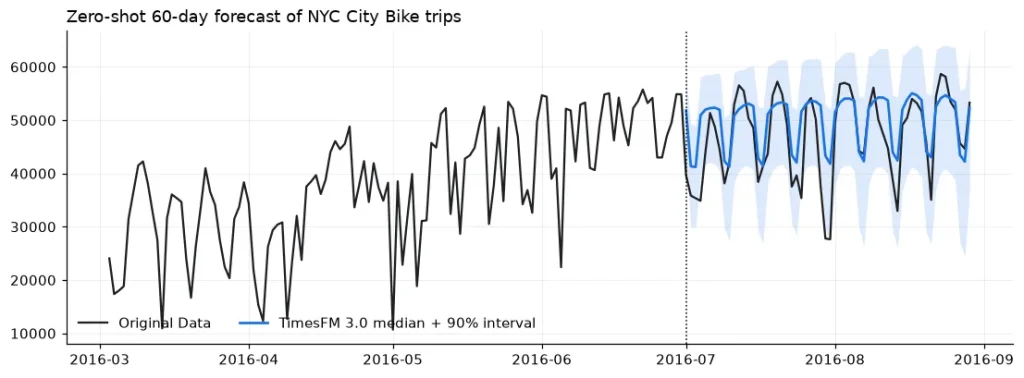
Without even having to specify the frequency of the time series, the model identified it without difficulty. With the exception of a few cases, 91.67% of the predicted days fall within the model’s 90% confidence intervals.
Result evaluation
To evaluate the results, we’ll use BigQuery’s AI.EVALUATE function, which allows us to evaluate a TimesFM model against actual historical results.
| Model | mean_absolute_error (MAE) | mean_squared_error (MSQE) | root_mean_squared_error (RMSE) | mean_absolute_percentage_error (MAPE) | symmetric_mean_absolute_percentage_error (sMAPE) | mean_absolute_scaled_error (MASE) |
| TimesFM 3.0 | 4,424.26 | 37,026,770 | 6,084.96 | 11.06 % | 9.91 % | 0.755 |
We can see that, on average, the predictions were not high. If we analyse only the percentage differences (MAPE), we see that the model, on average, deviates by 11.06% from reality. For a model trained in a single run, without optimising hyperparameters, this is a surprising result.
On the other hand, we can also compare the 3.0 model with its 2.5 version, which, at the time of writing this article, is the default model. This allows us to evaluate the improvement brought about by the upgrade.
| Model | mean_absolute_error (MAE) | mean_squared_error (MSQE) | root_mean_squared_error (RMSE) | mean_absolute_percentage_error (MAPE) | symmetric_mean_absolute_percentage_error (sMAPE) | mean_absolute_scaled_error (MASE) |
| TimesFM 2.5 | 4,988.62 | 45,805,870 | 6,768.00 | 12.59 % | 11.13 % | 0.851 |
| TimesFM 3.0 | 4,424.26 | 37,026,770 | 6,084.96 | 11.06 % | 9.91 % | 0.755 |
The result in version 3.0 is better in every respect, which was to be expected, but it’s interesting to see direct evidence of this.
But is this result better than the trivial solution—simply comparing it directly to the past, without performing any calculations?
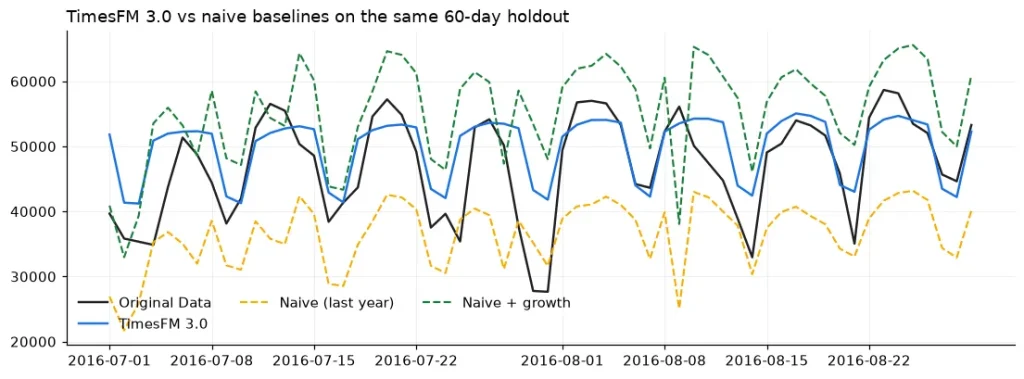
TimesFM 3.0 outperforms the simplest models that may exist, with the simplest models achieving an MAPE of 22%.
Parameter optimisation
As we have seen, we obtained the previous models without modifying the parameters. What could we improve if we did change them?
There are two parameters. First, the horizon, which only affects how many data points are predicted (for example, a horizon of 30 would mean 30 predictions from the cutoff point); and second, the context window, which determines how many past data points are considered to predict the value.
In version 3.0, the default context window is always 2048 (the maximum value). We can see how reducing this number affects the results:
| context_window | MAE | RMSE | WAPE % | MAPE % | coverage % (points inside confidence interval) |
| 64 | 5107.71 | 6700.46 | 10.86 | 11.38 | 93.33 |
| 128 | 5448.34 | 6576.89 | 11.58 | 12.04 | 96.67 |
| 256 | 5113.19 | 6466.98 | 10.87 | 11.36 | 96.67 |
| 512 | 4505.97 | 6058.47 | 9.58 | 10.10 | 91.67 |
| 1024 | 4411.32 | 6063.77 | 9.38 | 9.89 | 91.67 |
| 2048 | 4424.26 | 6084.96 | 9.40 | 9.91 | 91.67 |
Increasing the context window does not always lead to better results. However, in this specific case, the difference between the optimal value (1024) and the default value (2048) is extremely small. Even so, it appears that there is room for optimisation when choosing this parameter.
Anomaly detection with BigQuery TimesFM 3.0
Unlike the simplicity of forecasting, anomaly detection requires two inputs. One is the historical value, which serves as a reference, and the other is the date from which to predict the anomalies.
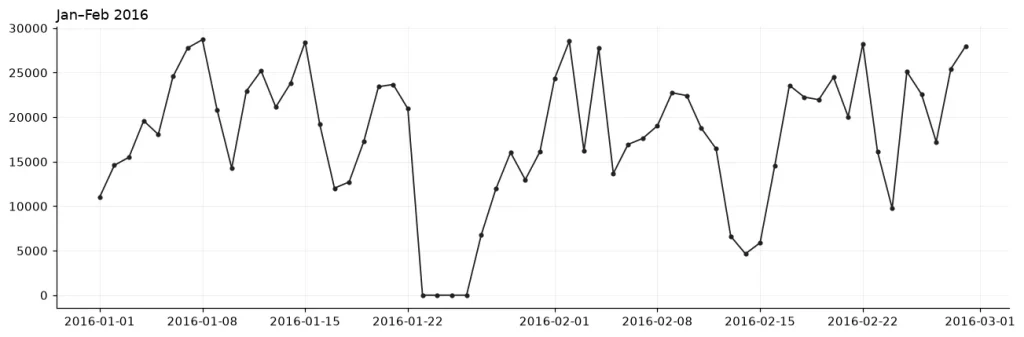
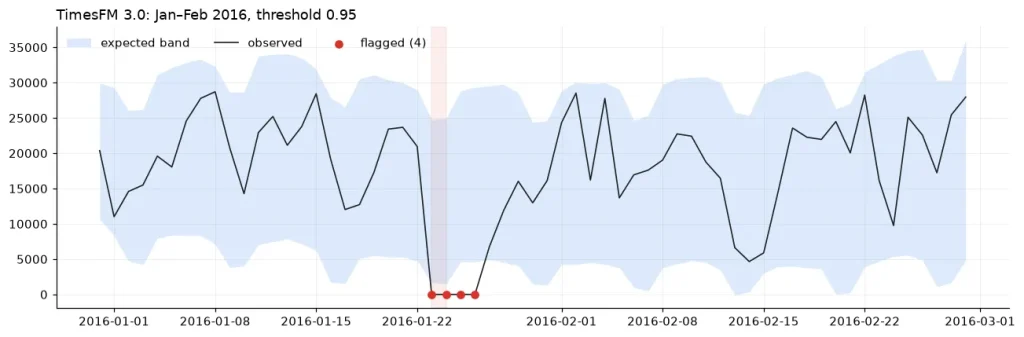
As an example, let’s consider a previously known anomaly. For instance, on January 23, 2016, an event suspended Citi Bike service in New York over the weekend.
SELECT * FROM AI.DETECT_ANOMALIES(
(SELECT trip_date, num_trips FROM `dataset.nyc_daily` WHERE trip_date <= DATE '2016-02-29'),
data_col => 'num_trips',
timestamp_col => 'trip_date',
target_start_timestamp => TIMESTAMP '2015-12-31',
model => 'TimesFM 3.0',
anomaly_prob_threshold => 0.95)
We can see that, in the results, the clearly anomalous event is flagged as such with 95% confidence.
If we extend the detection period, we see that we find virtually the same anomalies, and there do not appear to be any false positives:
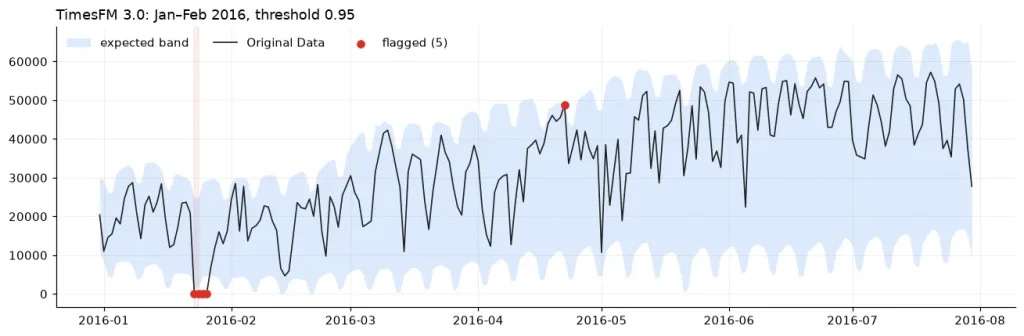
There is one unexpected date marked on the graph: April 22, 2016. If we analyse it, we see that it corresponds to Earth Day, when New York held its first “Car-Free Day”—which may explain the unusually high usage of the service.
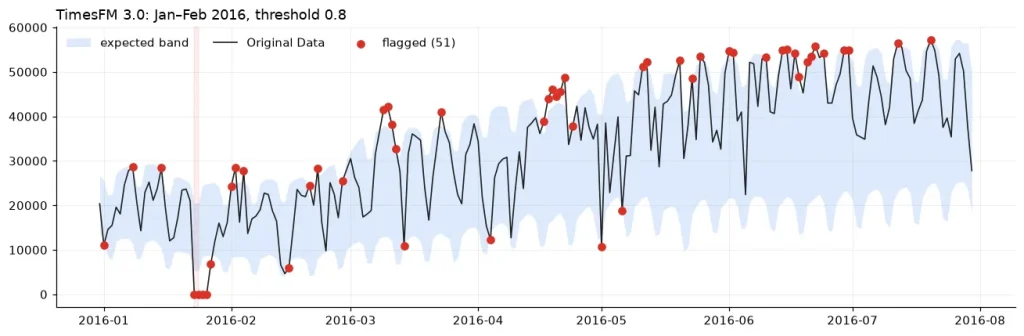
However, we must keep in mind that if we change the confidence interval, the detected anomalies will change.
At 80%, we have many more potential anomalies:
On the other hand, if we set the threshold to 99%, we face the opposite problem: we miss known anomalies:
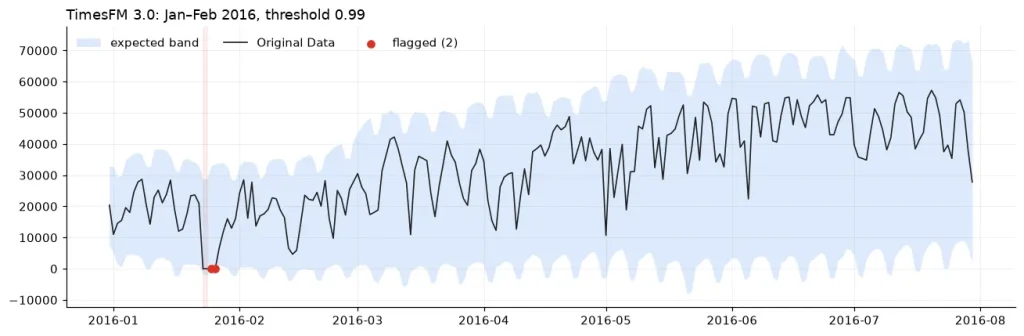
Since anomaly detection is designed to alert users to anomalous behavior, it is necessary to define the boundaries of such anomalies before deciding on a model.
Conclusion
To establish a minimum operational model or a baseline model against which to validate results, TimesFM 3.0 performs well with few parameters. This feature makes it possible to derive actionable insights from the data with relatively little effort.
The ease of running it from BigQuery also contributes to this goal. It is an ideal solution if your data already resides in that environment. Furthermore, it shows improvements over its previous version.
If you found this article interesting, we encourage you to visit the Data Science category to see other posts similar to this one and to share it on networks. See you soon!
