

Over the past two years, in one way or another, almost all companies have integrated generative AI into their operations. Most of them have gone through the process of testing a chatbot to handle research, summaries, and the drafting of documents or reports, among other tasks.
We are now at the stage where most organisations are integrating—or beginning to integrate—private generative AI systems for businesses into their routine toolkit. However, the real competitive edge lies not in simply “using AI,” but in delegating entire processes to autonomous agents. This is not a tool to query, but rather a digital employee who receives an objective, plans, executes, and verifies (with or without supervision, depending on the process’s level of maturity).
With this article, I aim to assist decision-makers—CEOs, CTOs, COOs, and business owners—who need to optimise the time and cost of implementing these types of tools in their companies.
- Keys to implementing AI in business
- What exactly is an AI agent (and what isn’t it)?
- Requirements for implementing an autonomous AI agent
- Single-agent or multi-agent specialised architecture
- Strategies for prioritising which agents to build
- How to measure the results of implementing AI in the company
- Mistakes to avoid when integrating autonomous AI agents
- Keys to successful integration
- Conclusion
Keys to implementing AI in business
- The confusion between licensing and capability. Purchasing 200 seats for an LLM does not necessarily lead to increased productivity if employees use the tool as an “enhanced Google” and resort to copying and pasting again.
- Measure ROI in terms of “hours freed up.” The real and direct contribution of AI to the business is freeing up employees’ time by entrusting tasks that save time to an AI agent.
- Don’t start with the most complex tasks. If you try to incorporate an AI agent into a high-risk or highly complex process right away, there’s a risk of not achieving satisfactory results in the early iterations. Furthermore, this could be the reason the project is ultimately abandoned.
- Don’t automate chaos. If the human process is already ambiguous or undefined, an agent will simply perform similar work at a faster pace. Furthermore, it will also repeat the same mistakes or generate the same problems over and over again. That’s why it’s very important to spend time defining processes (if they haven’t already been defined) before incorporating agents.
After all, integrating an agent should be viewed as bringing a new employee into the company. Therefore, there must be governance, boundaries, and oversight, just as there would be when welcoming a new team member.
What exactly is an AI agent (and what isn’t it)?
From the perspective of actual productivity, the difference between a chatbot and an AI agent or assistant isn’t technical—it’s operational:
- A chatbot is a consultant that you ask questions. You give it instructions on how to do something, but the work is still largely ours.
- An agent can be viewed as a digital employee. It is given a measurable objective and executes it from start to finish, using the same tools as a human: email, CRM, ERP, browser, Excel, desktop applications, etc.
Internally, the agent follows a technical cycle that it applies to every task we assign it:
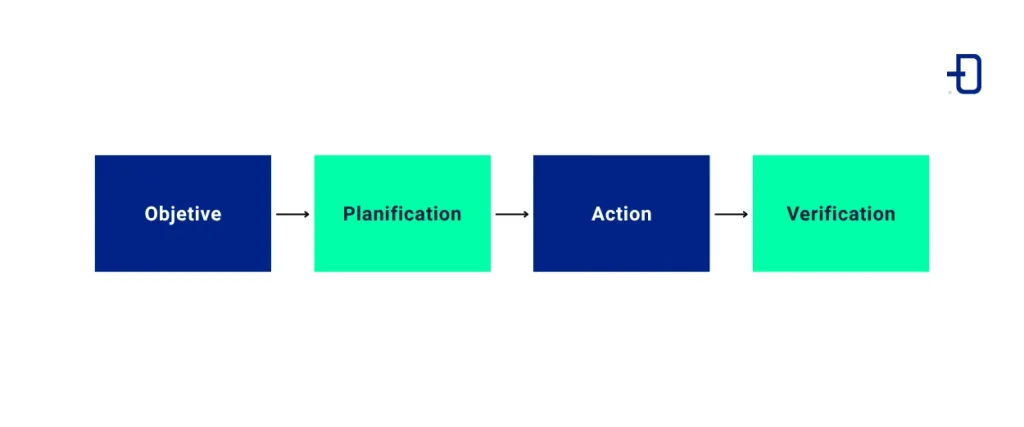
The assistant no longer waits for a prompt at every step. It receives a task such as “reconcile the December bank statement with the accounts payable ledger and prepare the journal entry” and carries it out based on its knowledge of that process. If it detects an unlinked invoice, it re-plans and only requests human approval at the decision point.
Comparison table
| Feature | Chatbot (passive AI) | AI Agent (active AI) |
| Nature | Reactive | Proactive |
| Cycle | Prompt → Response | Objective → Planning → Action → Verification |
| Scope | Generate text, summarise, answer | Execute end-to-end processes |
| Interaction | Prompt-based | Based on quantifiable objectives |
| Tools | Limited to your chat window | Uses APIs, SQL, a web browser, and legacy software (.exe) |
| Result | A written response | A task that has been completed and audited (appointment scheduled, accounting entry made, report submitted) |
| Risks without governance | Low | High |
Common myths about autonomous AI agents
- “An agent is a chatbot with access to APIs.” This statement is incorrect. A chatbot with APIs remains reactive, whereas an agent plans, executes in multiple steps, and self-corrects.
- “The goal is a ‘super agent’ that does everything.” This approach is very likely to lead to an successful implementation. Defining processes and responsibilities is key to later being able to assess the quality of the results obtained.
- “AI will end up deciding everything.” It’s important to deploy agents with clear limitations, especially in initial implementations. Their responsibility is to free up time for the human team and enable them to make better decisions.
Requirements for implementing an autonomous AI agent
Implementing an agent within a company requires reliability and security. It’s not simply a matter of “connecting an LLM to an API.” That’s why it’s vital to keep in mind these five fundamental pillars, which we’ll discuss below.
Define the objective
It’s important that the objective be based on a quantifiable result, not just an aspiration. For example, “helping with sales” is not a valid objective. In contrast, “qualifying incoming leads by budget and industry and scheduling an appointment with a sales representative if they meet the criteria” is. Without this, there are no metrics, and without metrics, there is no ROI.
Establish a knowledge base
The agent must have the appropriate context in each case to perform their tasks, which are typically divided into three layers:
- Static. This layer consists of manuals, FAQs, regulations, or internal policies (PDFs, Obsidian, wiki).
- Dynamic. This involves real-time data from the CRM/ERP, inventory status, and customer interaction history (APIs/SQL).
- User-specific. Who the customer is, their history, preferences, and tastes, etc.
If the agent does not have full access to the relevant information across the different layers to perform their tasks, there is a risk that the quality of their work will not be optimal.
Skills and tools
For the agent to have the necessary autonomy and deliver the best results, they will need a set of tools that allow them to obtain information to perform each task dynamically:
- Reading. For example, reading emails, querying SQL databases, or reading APIs.
- Writing. Tasks such as updating a status in Salesforce, creating a ticket in Jira, writing files, etc.
- Communication. Communication via Slack, email, WhatsApp, or Teams, among others.
- Navigation. Interacting with web interfaces where no APIs exist (browser automation).
In practice, an agent’s toolkit consists of guidelines on how to implement business logic and instructions for using each tool. That is why creating and defining corporate processes to transform them into agent tools (skills and tools) is key to implementing these systems.
Designing the reasoning flow
Once implemented, agents follow a logical flow that prevents issues such as hallucinations or processing incorrect data.
- Analysis. What is being requested, and what objective must be met?
- Planning. What steps should be taken? (For example, 1. Search for customer → 2. Verify balance → 3. Respond).
- Execution. Call the necessary tool.
- Evaluation. Is the result as expected? If not, replan.
An agent that does not evaluate is simply a script with an LLM slapped on top. That is precisely what makes many “agents” fragile.
Governance and security
During implementation, there are a series of strict rules that the agent must not violate under any circumstances:
- Financial. “You may not approve discounts greater than 15%.”
- Sales. “You may not promise delivery dates without checking inventory.”
- Legal. “You may not request sensitive data (passwords, credit card information) through unsecured channels.”
These limits are not mere “suggestions in the prompt.” They are rules enforced in the code and verified. That distinction sets an experiment apart from a production system.
Single-agent or multi-agent specialised architecture
A single-agent architecture that “knows everything” tends to fail due to complexity. Furthermore, it is difficult to audit, and when something goes wrong, it is unclear where the failure lies or how to correct it.
Without a doubt, the winning strategy is a network of specialised agents. This network can be more or less extensive depending on the size of the processes, the areas or departments within the company, responsibilities, etc. Below is an example of three types of agents for a company with multiple processes and areas:
- Triage agent. An assistant who receives the request and routes it to the appropriate expert.
- Expert agents. We have a finance specialist (reconciliation, collections), a sales specialist (prospecting and scheduling), a support specialist (incident resolution), etc.
- Supervisor. Their role is to ensure that experts meet their objectives and to report to management, requesting intervention when limits are exceeded.
The supervisor can be a key figure in many cases. Their involvement transforms the agents into a manageable team, with a single point of control and a centralised log. This is what allows management to know, at any given moment, what the agents are doing and how they are spending their time.
Strategies for prioritising which agents to build
Deciding which types of projects to start with when implementing agents can be a reasonable concern. Below is a matrix to help you decide which types of projects to implement based on the company’s priorities:
| Technical complexity | Business impact | Priority | Project type |
| Low | Medium | High | Quick win (e.g., internal FAQ agent, report generator) |
| Medium | High | Very high | Strategic project (e.g., lead scoring, bank reconciliation) |
| High | High | Medium | Digital transformation (e.g., end-to-end operations management) |
| High | Low | Low | Discard or postpone |
Starting with quick wins can build initial trust, which is ideal for later tackling other, more complex issues.
How to measure the results of implementing AI in the company
Ideally, you should focus on person-hours freed up and reduced response times, although it’s not always easy to obtain good metrics for these areas. Below are some examples of KPIs that might be useful:
- Minutes per process before/after (reconciliation, reporting, ticket triage).
- Percentage of tasks completed without human intervention (autonomy rate).
- Rate of exceptions escalated to a human (should be low and stable).
- Average response time to the end customer.
- Number of skills promoted from staff to enterprise level (indicator of actual adoption).
- Total cost per task (infrastructure + tokens) vs. the human cost of the same process.
Additionally, it’s important to provide genuine feedback on an agent’s contributions, just as you would for an employee on probation. And, of course, involving employees in the creation of their own skills will help them see that the agent acts as an assistant who enhances their capabilities rather than serving as a replacement.
Mistakes to avoid when integrating autonomous AI agents
- Automate before simplifying. First, optimise the human process, and then deploy the agent on top of that process. Otherwise, you’ll end up automating chaos.
- Skipping the “human-in-the-loop” phase. The agent does 90% of the work, but a human approves the final action with a click (at least initially).
- Granting the agent full permissions from day one. Initially, controlled autonomy should be implemented only for low-risk tasks without supervision. For high-risk tasks, the agent must always request permission.
- Failing to version control the skills. Without version control, there’s no way to roll back when something goes wrong.
- Ignoring the idiosyncrasies of the role. Many professionals have their own “way of doing” things. Facilitating integration (via promotable personal skills) significantly increases adoption.
- Failing to audit the agent’s actions. What isn’t logged can’t be defended or improved.
Keys to successful integration
Implementing production agents requires a delicate balance between:
- Advanced technical expertise. Protocols (MCP), LLM orchestration, legacy UI automation, skill design, and data security.
- Business acumen. Identifying processes with clear rules, measuring impact, and managing change.
- Experience in real-world environments. Where system documentation is lacking, the API isn’t open, and data is confidential.
That’s why, when a company asks me to “set up AI,” my first question isn’t which model to choose. The question is: Which process, if we eliminate one day a week of manual work, will change the bottom line or the team’s capacity? Everything else follows from there.
Conclusion
In summary, AI is a multiplier. If you automate an inefficient process, the result will be that chaos unfolds more quickly. Conversely, automating a well-defined process with clean data, clear guardrails, and business metrics will translate into real capability: professional work hours freed up for what truly provides value and differential.
That said, at this point, it’s worth asking, “Is my company ready to make the leap from chatbots to digital employees?”
Implementing these systems requires balancing advanced technical knowledge with business acumen and real-world experience. If you’d like to learn in detail how private generative AI works for businesses, or if you’re looking for guidance on designing an organisation’s agent architecture, optimising its processes, or setting up an end-to-end support and deployment system, we’re here to help.
So much for today’s post. If you found it interesting, we encourage you to visit the Software category to see similar articles and to share it in networks with your contacts. See you soon!
