


SQLFluff is an SQL code linting and auto-formatting tool that we’ve already covered in previous articles. In SQL optimization with SQLFluff, we discussed how to install it from scratch and walked through the first steps for using it.
Implementing SQLFluff in a project is almost essential for ensuring that queries maintain a consistent style throughout the entire codebase. However, this tool isn’t just intended for use by a small team of developers. Its use can also be extended to larger teams seeking to standardise their coding style to make the code easier to read and to unify the style of the various queries written by all team members.
This is where problems arise, since a repository containing hundreds or even thousands of queries or models, CI/CD pipelines, and dozens of developers working in parallel makes linting much more complex to manage. What is a simple procedure locally can result in long wait times for a Pull Request. Furthermore, in the long run, rather than helping the team, it could become a source of conflict and tension among team members.
For this reason, in this article we’ll discuss how to integrate SQLFluff into real-world environments, ensuring stable and reasonable execution times and preventing CI blockages caused by style issues.
Challenges of production integration
Once a developer has their code ready, the next step is to integrate it into a larger system. That’s where the well-known CI/CD comes into play—which simply stands for continuous integration and continuous deployment. Although it may seem counterintuitive, this is where the first problems arise. In most cases, these issues aren’t related to style guidelines, but they are influenced by how the queries are constructed. One of the most common issues is related to the rendering process that SQLFluff needs to perform in order to analyse the code.
The cost of using dbt templater
When we use SQLFluff in a project based on dbt models, it does not directly analyse the contents of the SQL files. Before doing so, it must resolve everything used in the dbt code—such as macros, variables, references to other tables or data sources, and all the Jinja elements that dbt uses to function. To carry out this entire process, SQLFluff uses the dbt templater.
In case you’re not familiar with how dbt works, we’ll briefly explain what the dbt templater is and what it does. The dbt templater is the component responsible for rendering SQL models using the actual project context. This generates a compiled version that SQLFluff can correctly interpret and parse.
Here’s an example:
-- dbt query
SELECT
    hotel_id,
    checkin_date,
    checkout_date,
    room_type
FROM {{ ref('stg_hotel_bookings') }}
WHERE checkin_date >= '{{ var("start_date") }}'
And, once dbt templater has rendered it, SQLFluff would analyse the resulting query.
-- Query after rendering
SELECT
    hotel_id,
    checkin_date,
    checkout_date,
    room_type
FROM dataset.stg_hotel_bookings
WHERE checkin_date >= '2026-05-29'
This way, SQLFluff can validate the actual SQL that will ultimately be executed by the database engine.
Drawbacks of dbt templater
The drawback is that, in order to validate a single SQL file, dbt templater may need to load a significant portion of the dbt project. For relatively small codebases, this shouldn’t be a problem. However, as we scale up and begin using SQLFluff in repositories with hundreds or even thousands of models, each linter run significantly increases continuous integration execution times.
Furthermore, another major issue with using SQLFluff in production environments relates to access. When run within a continuous integration pipeline, dbt templater needs access to the project’s full configuration, including profiles, environment variables, and even access credentials.
While this might not seem like a major issue at first glance, it becomes a problem when it requires replicating the dbt execution configuration within the CI process, as it increases maintenance complexity and reliance on external systems.
For these two main reasons, when projects are of a considerable size, it is advisable to separate the linting process from the execution environment. This way, SQLFluff can analyse the models without needing to establish connections to the data infrastructure.
Decoupled CI and hybrid environments
Since the primary use of SQLFluff is to run a linting process on our SQL code, it is highly recommended to decouple everything related to SQLFluff from the data warehouse during the continuous integration process.
To do this, one possible option is to define a specific target within the profiles.yml file that is intended exclusively for this purpose. This way, when SQLFluff runs during the process, it will not connect to any data warehouse. It will only have the minimum configuration necessary to render the models so that the corresponding linting can be performed.
To demonstrate how to implement this process with an example, let’s assume that our profiles.yml file looks like this:
my_dbt_project:
  target: lint
  outputs:
    lint:
      type: bigquery
      project: lint-project
      dataset: lint_dataset
      location: europe-west2
      method: service-account
      threads: 1

    dev:
      type: bigquery
      project: development-project
      dataset: analytics
      location: europe-west2
      method: service-account
      threads: 3

    prod:
      type: bigquery
      project: production-project
      dataset: analytics
      location: europe-west2
      method: service-account
      threads: 6
As you can see, there is a defined target called lint that associates the project and the dataset with a specific configuration intended exclusively for the linting process. This allows SQLFluff to render the model while minimizing the need to use development or production configurations, thereby streamlining the entire CI/CD process.
On the other hand, while it’s true that this strategy simplifies the process—because it avoids exposing credentials—it presents another challenge that must be addressed when working with SQLFluff. You must manage the use of dynamic variables and Jinja expressions that exist only at runtime. So, let’s explore how to deal with this issue.
Managing dynamic variables
As we’ve mentioned, another common issue with SQLFluff in production environments is the use of dynamic variables or Jinja expressions that are rendered at runtime.
An example of this scenario could be the use of a variable in a dbt model, such as:
{{ var('start_date') }}From dbt’s perspective, this is perfectly valid. However, SQLFluff does not know the value of that variable during its code analysis. Therefore, the linting process results in templating errors even though the query is correct and functional.
The solution to this problem is relatively simple. It involves providing SQLFluff with the necessary context so that it can automatically figure out how to resolve it. Although it may seem complicated, this can be done by creating the configuration file generated during the basic setup described in the previous article. Simply, and following the example of the variable from earlier, we would need to add the following to our .sqlfluff file:
[sqlfluff:templater:dbt:context]
start_date = 2026-05-29
With this block, we set simulated values for the variables defined using var() in dbt at render time. This allows SQLFluff to interpret the code without needing to know the full execution context.
As you can imagine, this is especially important in projects where dbt, Jinja, macros, or dynamic variables play a significant role. Thanks to this, SQLFluff will perform its processes much more easily and, above all, efficiently.
Optimising linting scope
Now that we’ve discussed two of the most important issues related to configuring SQLFluff in a large-scale project, the next step is to analyse the runtime of the linting process. Although this doesn’t directly affect the code itself, running a full repository analysis every time a pull request is made isn’t the best idea. It could end up becoming a major bottleneck for the project.
Naturally, during development, only a few models within the repository are typically modified or added. However, if not configured properly, continuous integration may run an analysis of all SQL files in the repository with every Pull Request. This, as you can imagine, is not only unnecessary but also completely inefficient. Every new upload will repeat the same procedure and check the same code over and over again.
For this reason, it’s common practice to limit the analysis to only those files that have been modified compared to what’s already in the repository’s main branch. This way, SQLFluff only analyses the files that truly need to be checked, since they’ve been changed and may contain linting errors.
Version control
To configure this, the easiest approach is to use the version control system itself. This way, we can see which files have been modified and need to be linted.
For example, in a Git-based environment, we can list all files that have been modified relative to the main branch using the following command:
git diff --name-only origin/main...HEADBased on this result, you will only need to filter the SQL files and run SQLFluff on them.
sqlfluff lint $(git diff --name-only origin/main...HEAD | grep '\.sql$')In this way, the linting process no longer depends on the total size of the repository but instead depends exclusively on the volume of changes introduced in each pull request.
On the other hand, as you might expect, these commands are not run manually. It’s standard practice to integrate them into the continuous integration pipeline so they run automatically during the validation process for each pull request.
Furthermore, integrating SQLFluff into the CI/CD process offers a significant advantage over validations performed locally during development. This is because, even if pre-commit has been configured and used (as explained in the previous post) to perform linting every time a commit is made, this process depends on each developer’s individual configuration. In contrast, if linting is performed as part of the continuous integration process, it ensures that all changes comply with the same rules before being merged into the main branch.
For this reason, it’s common to use both approaches in production environments. First, each developer validates the code locally before committing it using pre-commit. Then, the code is validated again during the continuous integration process to verify that it follows the rules specified centrally. This ensures a consistent validation process throughout the entire development cycle.
Strategies for gradual adoption in teams
So far, in both articles on SQLFluff, we’ve been looking at how to optimize the tool from a technical standpoint. However, there’s another aspect that’s just as important when using a linter: ensuring that the team is able to use the tool without creating tension or friction.
This point is crucial, because using a linter isn’t just a matter of installing it, enabling all the rules, and running it. In large projects, with hundreds of models and a large team, this approach usually creates more problems than it solves.
For this reason, in real-world environments that are already up and running, it’s much smarter and more effective to introduce SQLFluff gradually. This way, the team can adapt little by little, preventing it from becoming a source of conflict among developers.
With that said, let’s look at some strategies you can use to effectively integrate SQLFluff into teams.
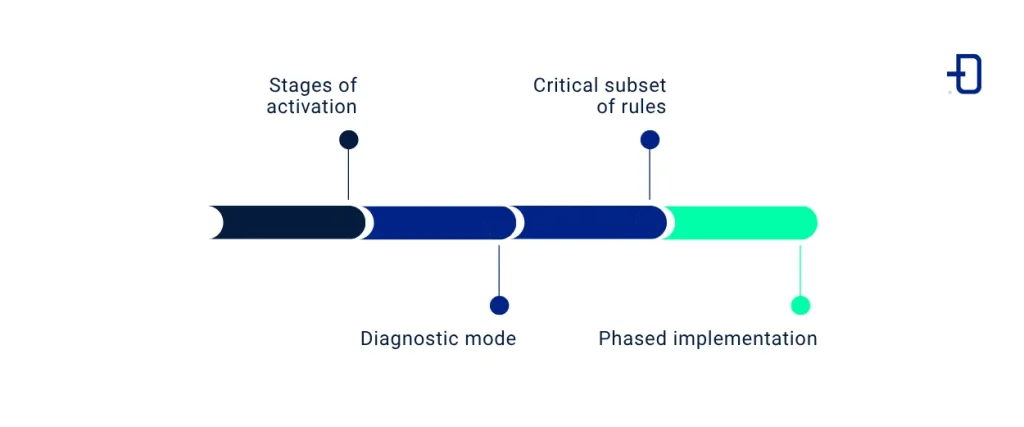
Activation phases
When attempting to introduce a linter like SQLFluff into code that already contains hundreds or even thousands of queries, it would be a mistake to assume that all rules must be enabled for the entire codebase right from the start. Doing so will likely not only generate a massive number of changes that are nearly impossible to review but will also become a huge source of friction for developers.
For this reason, a much smarter way to approach the process is to activate SQLFluff in a phased and progressive manner. Ideally, you should follow a roadmap that first allows you to assess the scope of the corrections and then implement them in an orderly fashion without causing discrepancies.
Diagnostic mode
The first phase is to run SQLFluff within the CI/CD pipeline without blocking the pull request if errors are detected. This way, we can assess the state of the repository and determine the volume of changes needed to implement all the desired linting rules.
It’s important to do this first. In a legacy project, it’s common to find hundreds of violations of established rules, accumulated over the years throughout the code. If you try to enforce these rules all at once, you can easily break the code. For this reason, the goal in this phase isn’t to fix everything at once, but to assess the technical debt across the entire repository.
Critical subset of rule
Once the scope of the changes to be made is known, we move on to the next step. Instead of activating all the rules at once, we establish a set of core rules that are essential to the project. For example, rules regarding the mandatory use of aliases, ambiguous references, or the use of basic structures.
At this point, it’s crucial to focus on what’s important and prioritise that over aesthetics. For example, determining whether a dataset should be on the same line as the `FROM` clause or on a separate line isn’t as relevant to the code as ensuring that aliases have at least three letters to improve readability.
Phased implementation
At this point, you should have already implemented the first rules and made the initial adjustments to the code. The next step is to gradually add new rules that address various linting issues in our code. This process of tightening the rules can be approached in several ways.
The first option is to enable enforcement on a folder-by-folder basis, starting with the most critical areas of the project. This allows the code to be gradually improved while keeping vital parts protected from potential changes. Another alternative is to follow a schedule, adding new rules to the entire repository on a weekly or monthly basis.
The key here is that the changes be predictable. This way, the entire team will be aware of what changes are coming and can incorporate them into their query-writing workflows. Furthermore, by taking a gradual approach, SQLFluff ceases to be seen as a problem that must be adapted to and instead becomes a process that is being implemented and that enhances the way the team works.
Noqa and the danger it poses
We’ve already seen how important linting is for maintaining code quality and consistency, and how to implement it in production environments in a phased and gradual manner. The next point to consider is how to get developers to adopt these linting rules in their day-to-day work rather than seeking strategies to circumvent them.
The quickest and easiest way to bypass a specific rule is to use the noqa directive. For example, if we have rule AM04 enabled—which prohibits the use of SELECT * and requires explicitly declaring the columns used—the following code will trigger a linting error:
SELECT *
FROM my_table
However, if we disable that specific rule in this same code using the `noqa` directive, the linting will no longer fail:
-- noqa: disable=AM04
SELECT *
FROM my_table
-- noqa: enable=AM04
This can become a problem because if it’s done repeatedly rather than as a one-time action, the linter completely loses its usefulness, and the code once again becomes difficult to scale and maintain.
For that reason, although noqa can be a very useful tool for handling necessary exceptions in certain parts of the code, it should not be used as the default solution. The goal is not to prohibit its use, but to ensure that every exception is clearly identified and justified and can be reviewed when necessary. In this way, noqa remains a very useful tool. However, if used indiscriminately, it can undermine the effort being made to achieve maintainable and scalable code.
Separating Autofix from business logic
Another common problem that arises when introducing SQLFluff into a project with a large amount of legacy code occurs during code reviews.
For example, a developer makes a small change of one or two lines in a file containing legacy code. If an sqlfluff fix is applied to this code—which has never been formatted before—before committing, the result will be a pull request with hundreds of changes that need to be reviewed, even though the significant change consists of only one or two lines.
In these cases, the problem isn’t the linting itself. Rather, it becomes practically impossible to conduct an effective code review. When stylistic changes are mixed with functional changes, it becomes very difficult to distinguish one from the other. For this reason, it’s standard practice in such cases to make a clear separation between the two types of changes. Functional modifications to the code should be kept on a separate branch. On the other hand, everything related to the formatting process will be carried out on a specific branch to which an sqlfluff fix will be applied to resolve all linting issues.
This ensures that each pull request has a clearly defined purpose. Furthermore, it will be much easier and more intuitive for developers reviewing the code to know what to look for in each pull request. This reduces the risk of errors and makes it easier to track the history throughout the repository.
Conclusion
As we’ve seen throughout this post, as projects grow, introducing a linter is no longer a trivial matter but rather a process that must be carefully planned. Aspects such as continuous integration performance, legacy code management, the adoption of linting mechanisms by the entire team, and the impact of these changes on code review processes are just as important as the tool’s configuration itself.
For this reason, ensuring that SQLFluff integrates correctly into production environments depends not only on defining an appropriate set of rules. It’s also a matter of integrating it properly into the team’s workflow. If done gradually, while maintaining control and traceability over changes, you’ll see the entire project gain in consistency and readability. However, if done haphazardly, it can lead to even more legacy code and an uncoordinated team that doesn’t know which rules to apply or when to do so.
In short, SQLFluff not only helps maintain more consistent and readable code but can also become a key tool for improving the project’s long-term maintainability. However, to achieve this, it is essential to accompany its adoption with a clear and well-defined strategy from the very beginning.
If you found this article interesting, we encourage you to visit the Data Engineering category to see other posts similar to this one and to share it on networks. See you soon!
