


One of the peculiarities of SQL and its many dialects is that they attempt to add features that are not present in ANSI SQL. This phenomenon is so common that it is usual to find that each dialect implements these functions in a very similar, but not identical, way.
Pipe operator: What it is and how it works
In this regard, we can mention GoogleSQL as an extreme case. Recently, this service added a new operator to try to solve some of the most common problems of classic SQL.
The new addition of the pipe operator to GoogleSQL makes it possible to change how a query is posed. Basically, what it does is divide a query into several CTEs (Common Table Expressions) so that each one represents a step in data processing.
Pipe operator in complex queries
The biggest problem with understanding complex queries in SQL is the syntactic order compared to the semantic order. In the following image, we can see an example:
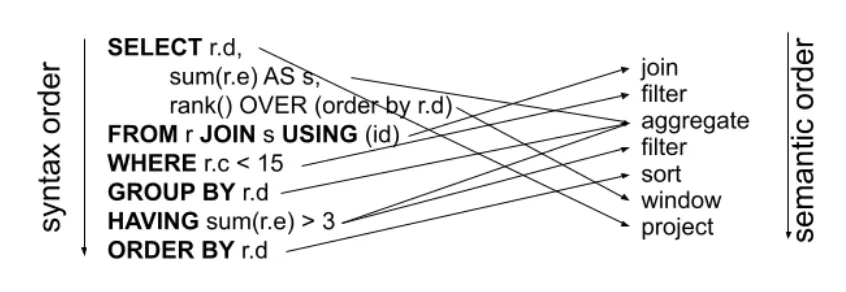
The purpose of pipe operator is to resolve this discrepancy by modifying the way the query is written so that the syntactic and semantic order match. This not only simplifies the query, but also makes it much easier to understand.
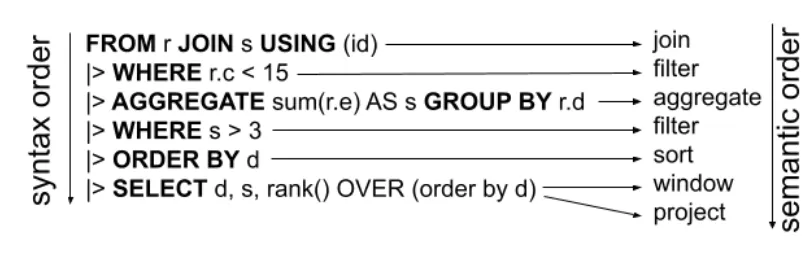
To define the pipe operator, use the pipe symbol, |>, the operator to be executed, and the arguments. For example, |> SELECT column1, column2. In addition, they can be chained infinitely as long as they are valid operations. The official Google Cloud page has a complete list of the pipe operator query syntax.
Organising the syntax in this way has great advantages. When we have more complex queries, which often make use of subqueries, it is difficult to evaluate their behavior. This makes maintenance and debugging extremely difficult as the query grows. However, with a linear organisation, it is possible to analyse each step individually. This greatly simplifies these considerations.
Example of a query with a pipe operator
Next, we will look at the status of the code in its original form:
WITH users AS (
   SELECT 1 AS user_id, 'Alice' AS first_name, 'Smith' AS last_name
   UNION ALL
   SELECT 2, 'Bob', 'Johnson'
   UNION ALL
   SELECT 3, 'Carol', 'Williams'
),
products AS (
   SELECT 101 AS product_id, 'Laptop' AS product_name, 1200.00 AS price
   UNION ALL
   SELECT 102, 'Phone', 800.00
   UNION ALL
   SELECT 103, 'Headphones', 150.00
),
orders AS (
   SELECT 1001 AS order_id, 1 AS user_id, 101 AS product_id, '2025-09-01' AS order_date
   UNION ALL
   SELECT 1002, 1, 103, '2025-09-01'
   UNION ALL
   SELECT 1003, 2, 102, '2025-09-02'
   UNION ALL
   SELECT 1004, 3, 101, '2025-09-03'
   UNION ALL
   SELECT 1005, 2, 103, '2025-09-04'
)
In the following code block, we will show the query in its original form:
SELECT
   u.user_id,
   u.first_name,
   u.last_name,
   (
       SELECT COUNT(*)
       FROM orders o
       WHERE o.user_id = u.user_id
   ) AS total_orders,
   (
       SELECT SUM(p.price)
       FROM orders o
       JOIN products p ON o.product_id = p.product_id
       WHERE o.user_id = u.user_id
   ) AS total_spent,
   (
       SELECT STRING_AGG(p.product_name, ', ')
       FROM orders o
       JOIN products p ON o.product_id = p.product_id
       WHERE o.user_id = u.user_id
   ) AS products_ordered
FROM users u
ORDER BY total_spent DESC;
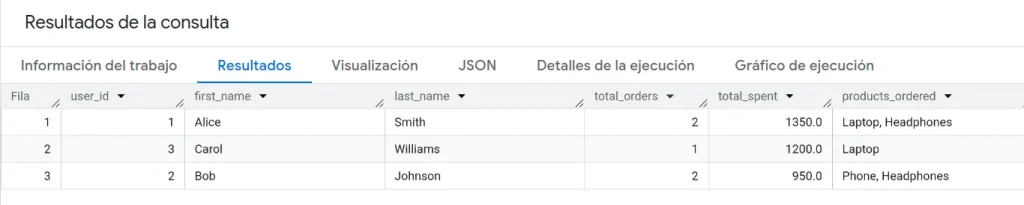
The results obtained would be as follows:
Now, we proceed to run the same query but with the pipe operator:
FROM users
|> JOIN orders ON orders.user_id = users.user_id
|> JOIN products ON products.product_id = orders.product_id
|> EXTEND COUNT(*) OVER orders AS total_orders
  WINDOW orders AS (PARTITION BY users.user_id)
|> EXTEND SUM(products.price) OVER products AS total_products
  WINDOW products AS (PARTITION BY users.user_id)
|> EXTEND STRING_AGG(products.product_name, ', ') OVER orders AS name_orders
  WINDOW orders AS (PARTITION BY users.user_id)
|> SELECT DISTINCT users.user_id, users.first_name, users.last_name, total_orders, total_products, name_orders;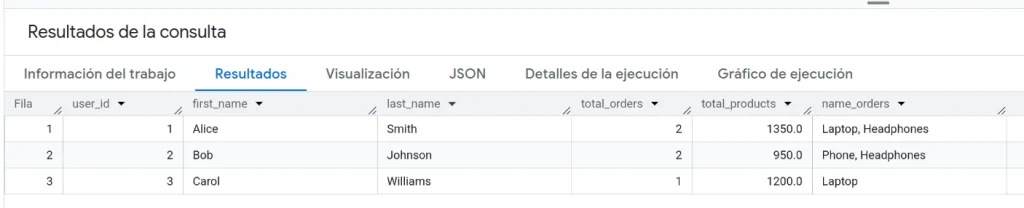
Conclusion
Pipe operators allow you to change how an SQL query is structured to a more intuitive form, where the semantic order and the syntactic order correspond. This makes complex queries easier to understand, facilitating their maintenance and evolution.
This is all! If you found this article interesting, we encourage you to visit the Data Engineering category to see all related posts and share it on social media. See you soon!
