

In the world of data engineering, the use of job orchestrators is key to ensuring that data arrives at the right time and in the right format. One of the most widely used orchestrators—which we’ve already discussed in several posts on this blog—is Airflow. However, there are other options that, despite being less popular, can be very useful in certain environments or use cases.
What is Dagster?
Dagster is an open-source task orchestrator that enables the automation of workflows, which is a vital part of any ETL or ELT process. Unlike other tools such as Airflow, which focus more on tasks, Dagster centers on DataAssets.
Throughout this article, we’ll see how to implement a simple task flow in Dagster. To do this, we’ll read a file (the CNN-DailyMail News Text Summarization dataset), apply embeddings to the text within it, and write the result to a separate file.
Example of a Dagster Workflow
The implementation of this workflow will consist of three phases. In the first phase, the file is read; in the second phase, the embeddings are applied; and finally, the result is written.
Defining Functions and Tasks
To carry out this example, the first thing we’ll do is define three functions using the @op decorator.
@op
def read_file() -> dict:
   """Example of a Dagster op that reads a CSV."""
   values = {}
   limit = 1000
   with open('/usr/src/app/dagster_example/ops/file.csv', newline='') as csvfile:
       reader = csv.reader(csvfile, delimiter=',', quotechar='"')
       for row in reader:
           if len(row)>1:
               values[row[0]]=row[1]
               limit+=1
               if limit>=10000:
                   break
   return values

# In this case, a read limit has been applied to prevent overloading the worker, since this is just an example
The task defined in this code reads a CSV file and converts it into a dictionary, which is then passed to a subsequent task.
@op
def embed_file(texts: dict) -> dict:
   model = TextEmbedding(model_name="BAAI/bge-small-en-v1.5")
   embeddings = model.embed(texts.values())
   embedded_documents = dict(zip(texts.keys(), embeddings))
   return embedded_documents
In this case, this task loads an embedding model and applies embeddings to the document dictionary created earlier. Finally, it returns a dictionary containing the result.
@op
def write_embeddings(texts: dict, embeddings: dict):
   with open('embedded_texts.csv', 'w', newline='') as csvfile:
       fieldnames = ['id', 'text', 'embedding']
       writer = csv.DictWriter(csvfile, fieldnames=fieldnames)
       writer.writeheader()
       for key in texts.keys():
           writer.writerow({'id':key,'text':texts[key],'embedding':embeddings[key]})
Finally, this task takes the two dictionaries generated in the previous tasks and writes the result to a CSV file.
Setting up the workflow
Once we have defined the three tasks, we set up a workflow using them with the @job decorator:
@job
def embedding():
   """Example of a simple Dagster job."""
   text_file = read_file()
   embeddings = embed_file(text_file)
   write_embeddings(text_file,embeddings)
This workflow performs the three tasks described above. First, it reads the file, then applies the embeddings, and finally uses both outputs to generate a final CSV file. Once we’ve defined this job, we can view the results in the Dagster UI.
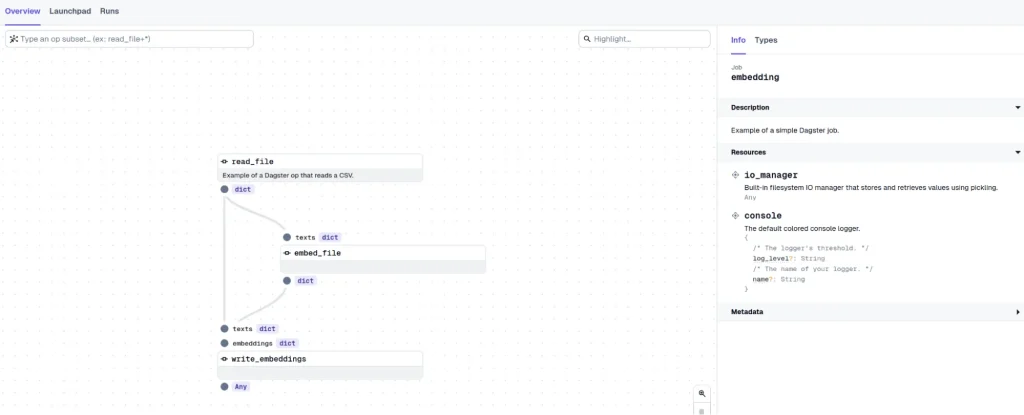
In the image above, we can see that the Dagster UI has generated the workflow in the correct order.
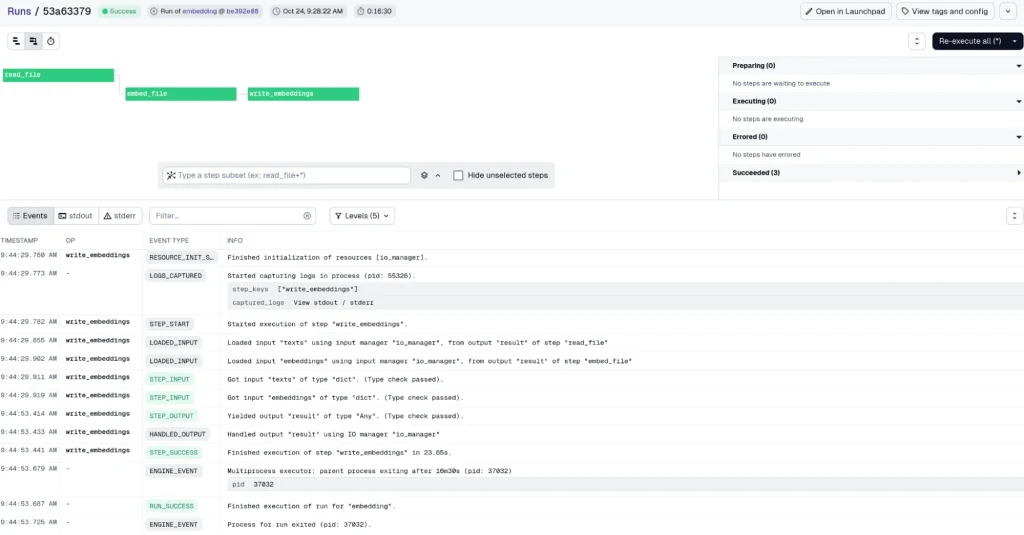
If we go to the Launchpad section, we can run the job. After a short while, we see that it completes successfully with a fairly robust logging system.
In addition, we can configure this task to run as a cron job using the @schedule decorator.
@schedule(
   cron_schedule="0 9 * * 1-5",
   job=embedding,
   execution_timezone="Europe/Madrid",
)
def embedding_schedule(context):
   """Example of how to setup a weekday schedule for a job."""
   date = context.scheduled_execution_time.strftime("%Y-%m-%d")
   return {"ops": {"embedding": {"config": {"date": date}}}}
We can see the result in the following automated workflow in the UI:

Conclusion
Dagster allows us to define arbitrary workflows in Python, offering a great deal of flexibility in what we can implement. Thanks to this capability, it’s possible to implement any ETL or ELT workflow that’s needed. Additionally, Dagster presents these workflows through an easy-to-understand UI, along with robust native logging. All these features make it an attractive option for workflow automation.
That’s all for now. If you found this post interesting, we encourage you to visit the Software category to see similar articles and share this post on social media with your contacts. See you soon!
